A way back to your reading place
You underline a sentence, keep a bookmark, ask a character a question. A few chapters later, you remember doing one of those things somewhere back there. A percentage tells you how far through the book you are. It does very little to help you find that moment.
The reader journey rail puts those saved places alongside the pages. It replaces the earlier page grid and is now taking shape in the native Slint reader. Chapter boundaries get small ticks. Highlights, bookmarks, and Green Room conversations get distinct symbols. Your current place gets a stronger needle. The aim is to make a short detour feel as ordinary as keeping a finger between the pages of a paper book.
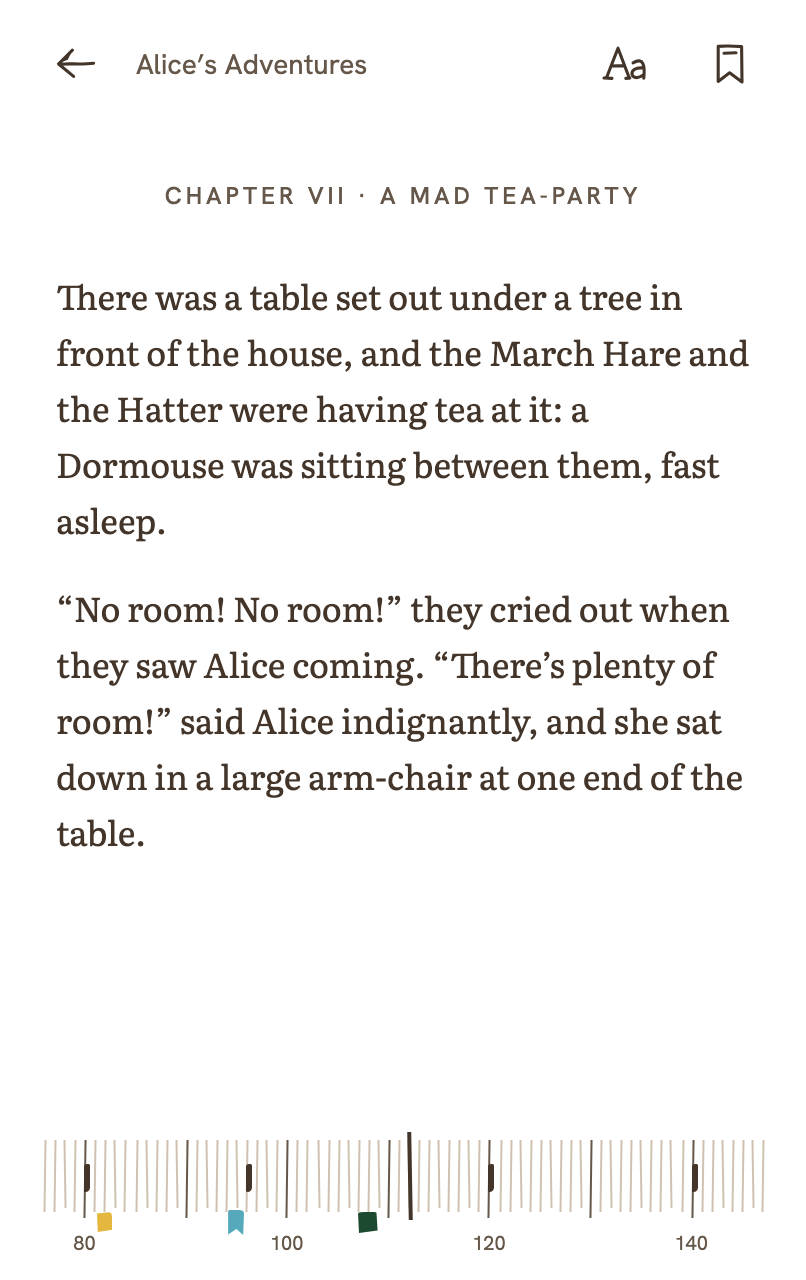
The interaction matters more than the line. Dragging the rail selects a preview destination. It does not turn the page, move narration, or update your reading progress. Go makes the jump; Cancel drops the preview. After a jump, the reader keeps the place you left. If one detour turns into several, the return point stays at that first departure, so finding a second interesting passage does not erase the way back to your reading.
Tapping a saved mark opens an inspector before anything moves. Several marks in a small space become a counted group you can open and choose from. That grouping follows the size of the touch targets on screen: two marks that fit separately on a wide display may need to share a target on a phone. Conversation marks carry the Green Room accent, but their shape also distinguishes them. An e-ink display should not need green ink to tell you where you had a conversation.
There is a spoiler problem even in this little piece of navigation. Jump back in a book and a saved highlight further ahead could give away a sentence you do not want staring at you yet. The rail keeps the place available while hiding its details: future chapter names become “Chapter,” and future conversations lose their speaker and mode labels. A highlight that straddles your current place stays hidden until you have passed its end. Testing only where the highlight begins would reveal the rest too early.
Those display rules sit alongside the server’s context boundary. Previewing a destination gives the companion no new book text. A saved conversation also keeps two separate positions: where its marker belongs, and the reading frontier attached to that conversation. Placing it on a ruler must not silently change what its character is allowed to know.
Underneath, the marks keep the ebook’s real location anchors, called CFIs. Their screen positions come from pages the reader has actually laid out. A percentage is never used to invent a book location, and an anchor we cannot place is omitted rather than dumped at the start of the rail. There is a visible limit to that honesty: the current native implementation maps the active section. It does not yet offer a complete whole-book journey map. Its page numbers are layout pages, which can change with typography, rather than page numbers from a printed edition.
This is a development checkpoint. The native tests cover future-detail redaction, grouping at different widths, and the preview state; the design fixtures exercise inspection and detours. Physical e-ink contrast and refresh still need device review, and the latest Android QA emulator did not boot, so a successful package build is not evidence of the interaction working on that device. The small promise we are working toward is a useful one: follow something that caught your attention, and still know how to get back.